Check if the price of the product is set in NetSuite.
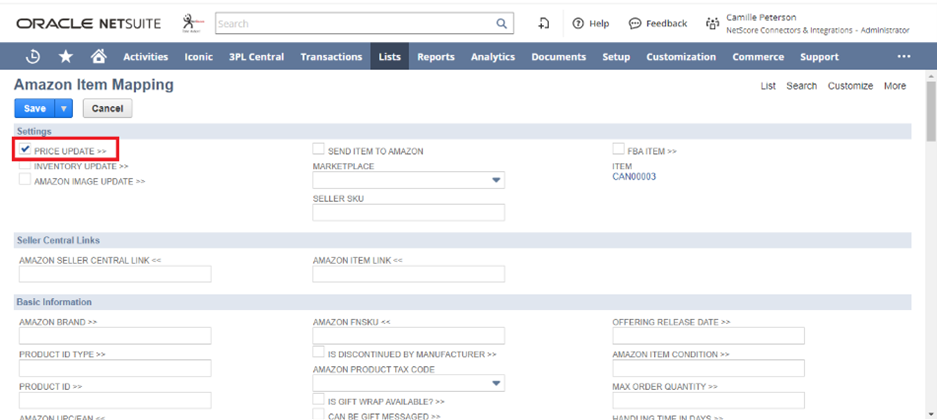
Ensure that a field in Amazon Item Mapping Record PRICE UPDATE >> is enabled or checked.
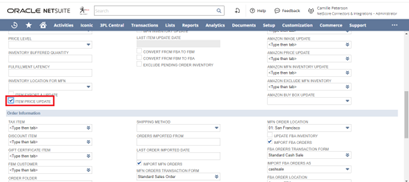
Ensure that a field in Amazon Setup Record ITEM PRICE UPDATE is enabled or checked.
Note: Ensure that a field in Amazon Item Mapping Record AMAZON PRICE UPDATE is set with the appropriate saved search.
I just went through the guide on how to ensure that the pricing updates between NetSuite and Amazon are set up correctly, and I have to say, it’s incredibly helpful! The step-by-step approach really demystifies a process that could seem daunting at first. It’s amazing how important it is to keep pricing synchronized in today’s e-commerce landscape; even a small discrepancy can lead to lost sales or customer trust!
Thanks for breaking this down so clearly! It’s made me think more about how backend processes can really impact the overall customer experience. This kind of knowledge definitely helps businesses thrive—I’ll be sure to share this with my team! Also, if anyone’s curious to expand their understanding of integrations, they might find additional insights here: block blast. Keep up the great work!
I found this very helpful and will be sharing it with my friends.