NetScore Magento NetSuite connector that seamlessly integrates the Magento web store with NetSuite seamlessly. It can manage your data & orders between NetSuite and Magento.
To reprocess an error record,
 Is this Helpful ? [jlad id=7864]
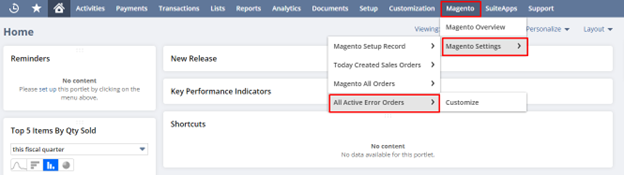
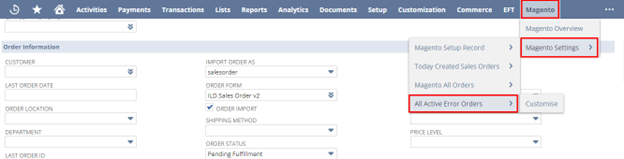
- Go to Magento error record list, Magento->Magento Setting->All Active Error Orders
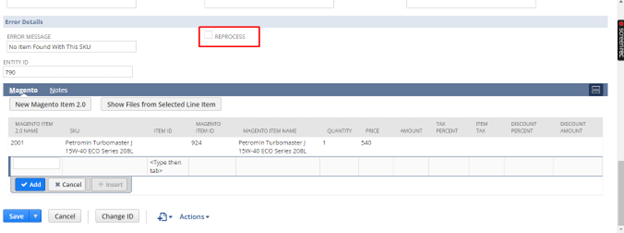
- Select the error record and click on edit option to open the record.
- Enable Reprocess check box in the Edit Details window and save the record.
Is this Helpful ? [jlad id=7864]- Create the item which was not found in NetSuite while importing an order from Shopify.
- Navigate to the respective error record.
- Enter details of the created item under a sublist called Item as shown in the screen.

- Enable the Reprocess
- Save the error record so that the connector pushes it in NetSuite as a sales order.
- Ensure that you have gone through the “Fields Mapping Document” because the connector relies on it.
- If you have any queries concerning the Fields, then reach out to the developer.
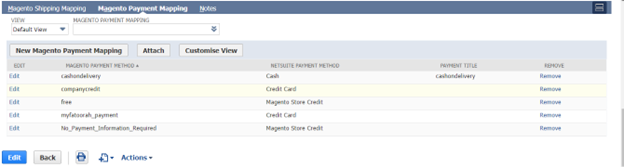
- Ensure that the payment methods have been mapped appropriately on a Set up record.
- Go to Magento>Magento Setting, and verify that the payment methods are mapped as expected.
- To add a new payment method, provide the payment method in Magento Payment Mapping Name field, and similarly provide a Netsuite payment method mapped to Magento Payment Method in NS payment Method See the screen below.
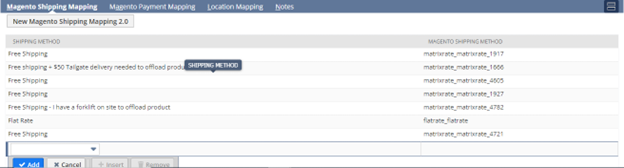
- Ensure that the Shipping methods have been mapped appropriately on a Set up record.
- Go to Magento>Magento Setting, and verify that the Shipping methods are mapped as expected.
- To add a new Shipping method, provide the Shipping method in Magento Shipping Mapping Name field, and similarly provide a Netsuite Shipping method mapped to Magento Shipping Method in NS Shipping Method See the screen below.
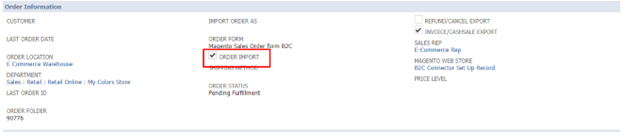
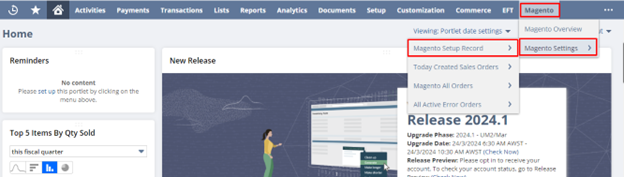
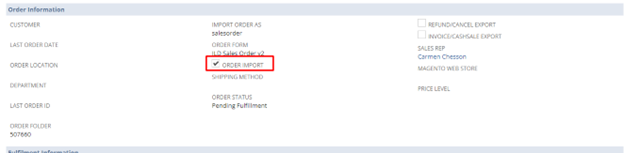
- Ensure that the Order Import checkbox is turned on in the Setup record.
- Go to Magento Setup Record>Magento Settings, to access the setup record and ensure Order Import check box is turned on. See the screen below.
How to change the order’s status prior to importing the orders from the connector for future orders?
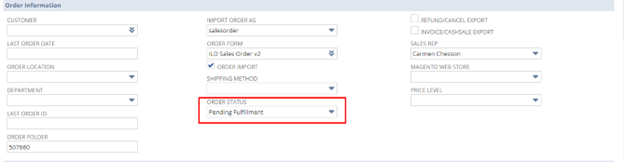
- Ensure that the Order Status checkbox is turned on in the Setup record.
- Go to Magento Setup Record>Magento Settings, to access the setup record and ensure Order Status check box is turned on. See the screen below.
- Go to error record list and search with an order Name/Number.
Figure out the error record which shows the cause of an interruption of the flow of a respective order, in a field called Error Message.
- If you find the order in the list of error records, then follow the steps listed in our first few questions in this FAQ document.
- If the respective order does not appear on the error record list, reach out to Netscore support.
- To go to error records list, Magento>Magento Setting>All Active Error Orders. See the screen below.
- Verify the SKU is same on both systems (NetSuite and Magento).
- Refer to the Fields Mapping document to find the appropriate field to store SKU Value in NetSuite.
- Ensure that Shipment Export checkbox is enabled in the Set Up record.
- Ensure the tracking number is entered in the appropriate field in the fulfillment record, as the connector refers to it while posting to Magento.
